


Antivirus Flux
4.2118.00 Reviews
App Specs
- Version
- 2.0.0.0
- Updated On
- License
- Free
- Downloads
- 10,000,000+
- Developer
- Leslies Gaming
- Categories
- Tools
- Platform
- Android
Screenshots
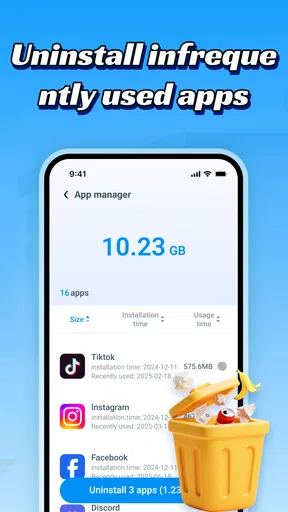
 Analysis by AppCompare
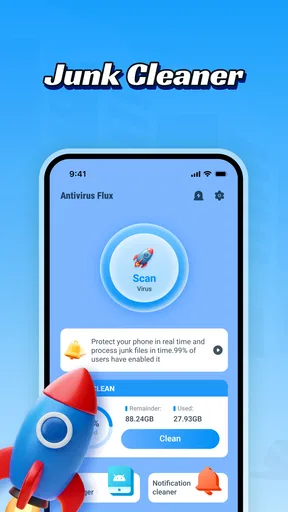
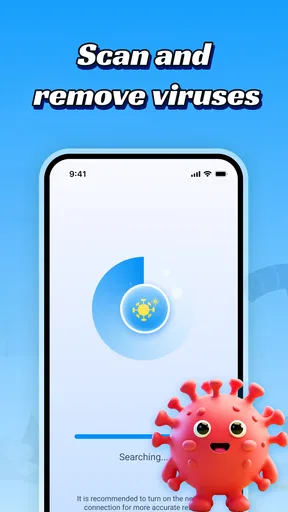
When my phone starts feeling cluttered, I want a tool that makes it easier to deal with unwanted files and gives me a clearer sense of security—not a parade of dramatic warnings. Antivirus Flux is aimed at those two everyday jobs: clearing mobile junk and checking for viruses. It is a free Android tools app from Leslies Gaming, and its straightforward purpose makes it easy to understand what it is for. My main reservation is equally straightforward: a cleaning or antivirus label alone does not tell me how thorough a scan is, so I would treat its results as useful guidance rather than a guarantee that every problem has been found.
What you get without paying
The most concrete part of the value proposition is the price: Antivirus Flux is free. You can try its core idea without making a purchase, which makes sense for someone who wants a basic cleanup and security tool but is not ready to pay for a broader maintenance suite. The app is rated for Everyone, so its intended audience is broad, though that does not remove the need to review any prompt carefully before taking an action on your phone.
Its scale suggests that plenty of Android users have been willing to give it a try. Antivirus Flux has an average rating of 4.2 from around 22,000 ratings, alongside over 10 million installs. Those numbers can help establish that the app is not obscure, but they cannot tell me whether its scans will suit a particular phone or whether a specific file is safe to remove. I would use the app for a practical check, not treat popularity as proof of protection.
The current release is version 2.0.0.0, and it runs on Android 7.0 or later. That makes the minimum system requirement worth checking before downloading, especially if you keep an older device in service. The version number is useful context when comparing what is installed on your phone, but I would not infer a particular set of capabilities or performance changes from the number alone.
A focused tool rather than a full maintenance suite
Antivirus Flux is best understood as a focused utility, not an all-purpose answer to every phone problem. Its stated role combines junk-file cleaning with virus detection. That can be convenient if you prefer one place to start when storage feels untidy and you want to run a security check, instead of searching separately for a cleaner and a scanner.
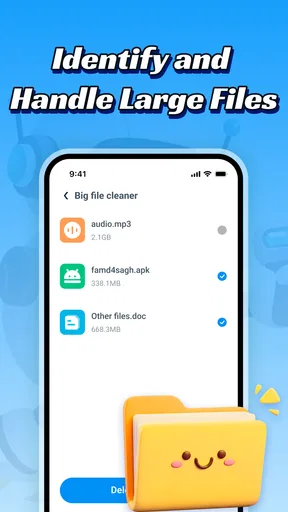
There is a trade-off in that simplicity. A dedicated storage manager may offer more direct control over large files, downloads, or media, while a security product focused on protection may provide a different set of safeguards. Antivirus Flux’s appeal is the overlap between cleanup and detection, but I would not assume that overlap replaces every specialist tool or the built-in settings already available on an Android phone.
For me, the useful question is not whether a cleaner can make a phone magically faster; it is whether it helps me identify something I can sensibly remove. Junk cleanup is most valuable when storage is actually constrained. If the phone has plenty of room and is working normally, repeatedly cleaning it may add little. I would start with the phone’s own storage view, then use a separate utility only if I need another way to review the situation.
Worth Reading Before You Choose

EA SPORTS FC Mobile 26 Is a Bigger Football Game, but It Takes Time

Flipboard Shows What News Apps Must Do Beyond the Feed

Switching to Android Auto Means Rethinking Your Driving Routine

Google Calendar Makes a Crowded Week Easier to Manage

Ludo King Makes the Most of the Minutes Between Plans

Baby Panda World Brings Quick Play to Modern Phones, but Its Game Library Feels Busy
How I would use it without rushing
My practical approach would be to run a check when there is a reason, such as a storage warning or an unfamiliar file concern, rather than making cleanup a daily ritual. Before removing anything, I would look at what the app has identified and consider whether I still need it. A cache or leftover item may be disposable, but a file that merely looks old can still matter to an app or to me. Review first, clean second is the habit that makes a cleanup tool safer and more useful.
Here is a realistic example: I am preparing to download a large offline map before a trip, and my phone says space is tight. I would first check what is taking up room, including downloads and media I recognise. Then I might use Antivirus Flux as another cleanup step, inspect its findings, and remove only items I understand. This workflow is more reliable than tapping a broad cleanup button just because I want to free space quickly.
The same cautious approach applies to virus detection. If a scan flags something, I would pause and read the app’s explanation before choosing what to do. A detection result is a prompt to investigate, not a reason to assume that every flagged item is harmful. If I were dealing with a serious security concern—such as suspicious account activity—I would also check account security and Android’s own protections rather than expecting one scanner to solve the whole problem.
One non-obvious benefit of combining the two jobs is that it can make a maintenance session more deliberate: I can think about storage and security together instead of treating them as unrelated chores. The limitation is that convenience can encourage overconfidence. A clean-looking result should not be read as proof that a device is completely secure, and a phone with more free space is not automatically faster in every situation.
Where it fits among the usual alternatives
Android’s built-in storage controls are often the sensible first stop because they let me inspect space use without adding another tool. For a person who only needs to remove an old download or review large media files, those controls may be enough. Antivirus Flux makes more sense when I specifically want a separate utility that brings cleanup and virus detection into the same app experience.
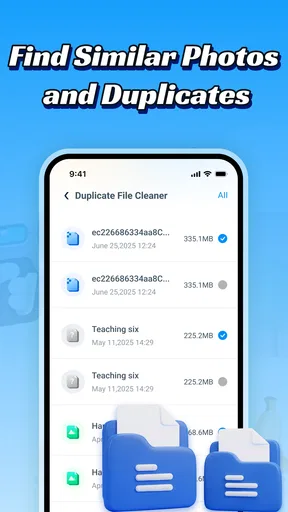
Compared with installing a dedicated antivirus product, the attraction here is a broader everyday task mix rather than security alone. Compared with a file manager or storage analyzer, the attraction is the virus-detection side. That does not establish that one approach is more thorough than another; the right choice depends on what problem I am trying to solve. If I want detailed file-by-file organization, I would favor a storage-focused tool. If I want a wider security setup, I would compare security products on the protection they clearly explain, rather than choosing by a cleaner feature.
There is also a useful boundary between cleanup and security that is easy to overlook. Removing clutter can help with storage pressure, but it does not replace careful app installation, software updates, or sensible account habits. Likewise, a virus scan does not tell me whether I have enough storage for a trip or a recording. Antivirus Flux is most coherent when I use it for the two tasks it is meant to address and keep those expectations separate.
Trade-offs I would keep in mind
The central trade-off is that a compact, free tool can be easy to try, but ease of access does not by itself establish depth. I would judge the app by whether its results are understandable and whether I can make an informed choice before acting. If the findings feel vague, or if I cannot tell why an item is being flagged or offered for removal, I would stop and use Android’s own controls or a more specialized tool instead.
I would also avoid treating a cleanup routine as maintenance for its own sake. Removing files without checking them risks losing something useful, while repeated scans that do not address a real concern can turn into busywork. My rule would be to connect each action to a clear need: reclaim space, review a concern, or check an unfamiliar situation. That keeps the app in a supporting role rather than making it the center of phone care.
There are 118 written reviews, which is a much smaller body of feedback than the overall rating count. I would read recent user comments for clues about how people experience the app, while remembering that individual reports may reflect different devices and expectations. In the end, my own decision would depend more on whether the app’s scan results are clear and useful on my phone than on a single review or aggregate score.
Making a cleanup session more useful
I would approach the app as a second opinion, not as a substitute for knowing what is on my device. A useful routine is to note the storage problem first, inspect the phone’s own storage breakdown, and then compare that picture with anything the cleaner identifies. If both point toward familiar temporary clutter, I can make a more informed decision. If they appear to disagree, I would avoid deleting an item just to reach a cleaner-looking screen.
This also helps answer a practical question: should I run it on a schedule? I would not make that my default. A scan is more worthwhile when a specific change prompts it—for example, storage becoming tight or a file seeming out of place. A scheduled habit without a clear reason can turn into repetitive checking, and it may encourage me to approve actions without properly considering them. Occasional, purposeful use is a better fit for a tool whose value depends on reviewing its findings.
Before using any cleanup suggestion, I would think about whether the file is replaceable and whether I know which app uses it. Personal downloads, documents, and media deserve particular care because removing them may solve a storage problem while creating a more important one. When I cannot identify an item confidently, leaving it alone is a sensible outcome; freeing space is not worth guessing about something I may need later.
What its scope means in daily use
Someone deciding whether to install it may wonder if the cleaner is enough to fix a slow phone. I would not choose it on that promise. Storage pressure is only one possible reason a phone feels sluggish, and removing junk does not automatically address every cause. If the device is slow but has plenty of available space, I would first consider other basic checks rather than repeatedly cleaning files and expecting a guaranteed change.
Likewise, the virus-detection role is a helpful reason to consider the app, but I would not treat one scan as a complete security plan. A clean result can be reassuring as one part of a check, while still leaving sensible habits important: keep the device maintained, be selective about what you install, and secure accounts separately. If I needed a clearly defined, broader security setup, I would compare dedicated security options instead of assuming a combined cleaner and scanner covers every need.
There is a privacy-minded trade-off in adding any utility that examines device contents: I would want to understand what it asks me to do and what its results refer to before granting or acting on anything. I would not assume that a tool needs access to every kind of personal file just because it can scan or clean. Reading prompts as they appear, and declining actions that do not make sense, is a practical way to keep control in the user’s hands.
Who is likely to get value from it?
I can see Antivirus Flux suiting someone who wants a no-cost starting point for checking junk files and running a virus scan, especially if having both tasks in one utility feels more convenient than switching between apps. It may also appeal to people who prefer a dedicated tool alongside Android’s built-in storage controls, provided they are comfortable reviewing results rather than accepting every suggested action automatically.
I would skip it if my only need is a quick, familiar way to delete a known download; the phone’s existing file and storage controls may be simpler. I would also look elsewhere if I need detailed file management, want a clearly defined security suite, or expect an app to guarantee that a device is clean. For those needs, a specialist option or the phone’s own tools may be a better fit.
My verdict is a cautious recommendation for the right kind of user. Antivirus Flux is free, has a clear everyday purpose, and combines cleanup with virus detection in a way that could make occasional phone maintenance more convenient. I would try it when I have a specific reason, inspect its findings carefully, and keep Android’s built-in controls in the mix. If you want a simple extra tool and are willing to make the final decisions yourself, Antivirus Flux is a reasonable option to consider; if you need specialist depth or hands-off certainty, I would choose a tool built around that need instead.
Pros
- Quick scans help identify common threats without much setup.
- Simple controls make core security features easy to find.
- Real-time protection can help catch suspicious files as they appear.
- A lightweight design may suit devices with limited storage.
- Useful for users seeking basic security in one app.
Cons
- Security effectiveness is difficult to judge without independent test results.
- Real-time protection may increase battery use.
- Some features may require a paid plan or subscription.
- Frequent alerts could become distracting during everyday use.
- Avoid installing alongside another antivirus
- as the apps may conflict.
FAQs for Antivirus Flux
What is Antivirus Flux, and what does it do?
Antivirus Flux is presented as a security app intended to help users check a device for potential threats and manage basic protection. Its exact tools can vary by app version and platform, so review the current store listing before downloading. Check whether it offers features such as real-time scanning, scheduled checks, or web protection rather than assuming every antivirus function is included.
Is Antivirus Flux safe to download and use?
No security app can be confirmed as safe solely by its name or description. Before installing Antivirus Flux, verify that you are downloading the official version from a trusted app store, check the developer’s identity and recent reviews, and read the privacy policy. Pay attention to requested permissions, especially access to files, accessibility settings, or device administration, and avoid granting permissions that are not clearly needed.
Is Antivirus Flux free, or does it require a subscription?
Pricing and access may depend on the version, region, and platform. Check Antivirus Flux’s store page and in-app purchase details to see whether installation is free, which features are included at no cost, and whether a trial or recurring subscription is offered. If you start a trial, note its renewal date and cancellation instructions so you are not surprised by a later charge.
Will Antivirus Flux slow down my phone or drain its battery?
The effect on performance depends on how Antivirus Flux works, your device, and the settings you enable. Scans may temporarily use processing power, battery, and storage, while continuous protection can run in the background. If you notice slower performance or increased battery use, check the app’s scanning schedule and background options, and compare the results with your device’s normal behavior.
Does Antivirus Flux replace the built-in security on Android or iOS?
Do not assume Antivirus Flux can replace the protections built into your phone. Android and iOS restrict apps differently, and an antivirus app’s abilities may be limited by the operating system; features advertised for one platform might not exist on another. Keep your operating system and apps updated, use trusted download sources, and consult the app’s current listing to understand what protection it actually provides.


